
Understanding Cron Schedules
Cron schedules tell Chat Bot when to run automated tasks like timers. Stream Studio uses a six-field cron format (including seconds). Simple presets cover common cases. Advanced gives precise control.
The Advanced Fields
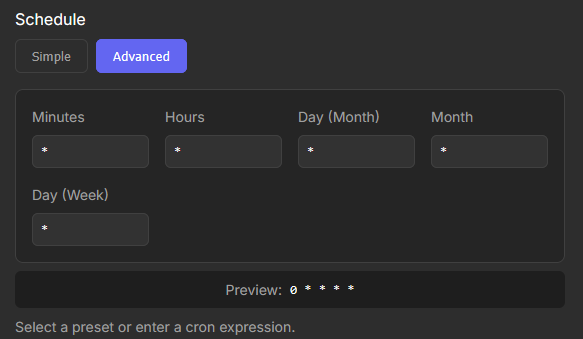
The six fields in the Advanced Schedule section.
Seconds
Which second(s) of the minute the timer should run. Allowed values: 0 to 59.
Minutes
Which minute(s) of the hour the timer should run. Allowed values: 0 to 59.
Hours
Which hour(s) of the day the timer should run. Allowed values: 0 to 23 on a 24-hour clock.
Day (Month)
Which day(s) of the month the timer should run. Allowed values: 1 to 31.
Month
Which month(s) of the year the timer should run. Allowed values: 1 to 12.
Day (Week)
Which day(s) of the week the timer should run. Allowed values: 0 to 6, where 0 is Sunday and 6 is Saturday.
Common Symbols
Asterisk (*)
A wildcard meaning "every". * in the Minutes field means the timer runs every minute. * in the Hours field means every hour.
Step Values (*/n)
Use this to specify intervals. */15 in Minutes runs the timer every 15 minutes (at :00, :15, :30, :45). */2 in Hours runs every 2 hours.
Comma (,)
Use commas to specify multiple distinct values. 0,15,30,45 in Minutes runs the timer at the start, quarter-past, half-past and quarter-to the hour. 1,3,5 in Day (Week) means Monday, Wednesday and Friday.
Hyphen (-)
Use hyphens to specify a range. 9-17 in Hours means the timer runs every hour from 9 AM to 5 PM inclusive. 1-5 in Day (Week) means Monday through Friday.
Specific Numbers
Use a specific number within the allowed range. 0 in Minutes plus 9 in Hours runs the timer at exactly 9:00 AM.
Example
Seconds
0 at the start of the minute. Minutes
*/30 every 30 minutes. Hours
8-16 from 8 AM up to, but not including, 5 PM. Day (Month)
* every day of the month. Month
* every month. Day (Week)
1-5 Monday to Friday. Resulting Cron Expression
The resulting cron expression is: 0 */30 8-16 * * 1-5